The Truth About the Ideapad 3 15 2021: Pros, Cons, and Verdict
The landscape of budget computing has undergone a significant transformation since 2021. In an era where remote work and digital learning became the primary modes of operation, the demand for affordable yet capable laptops skyrocketed. Among the myriad of options that flooded the market, the Lenovo Ideapad 3 15 (2021 model) emerged as a particularly prominent contender. Often positioned as a productivity workhorse for those who don't want to break the bank, this machine sought to bridge the gap between "cheap" and "value." However, with the passage of time and the release of newer architectures, the real truth about its performance, durability, and long-term utility has become clearer.
The Ideapad 3 has always been Lenovo’s answer to the entry-level consumer market, sitting just below the more premium Ideapad 5 and the high-end Yoga series. In its 2021 iteration, Lenovo made several strategic decisions regarding build quality, processor selection, and display technology to hit a specific price point. To understand whether this laptop remains a viable choice today or if it was merely a temporary solution for a global crisis, one must delve into the specifics of its construction and its internal capabilities.
Product Review and Comprehensive Analysis
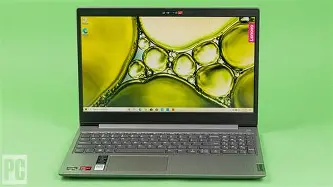
At first glance, the Ideapad 3 15 (2021) bears the classic Lenovo aesthetic: professional, understated, and functional. It is constructed primarily from polycarbonate (plastic), which is expected at this price range. While it lacks the rigid aluminum feel of a MacBook or a Dell XPS, the textured finish does a commendable job of resisting fingerprints and providing a decent grip. However, the 15-inch form factor means there is a significant amount of surface area, and users will notice some flex in the keyboard deck and the lid when applying moderate pressure.
The Display Experience
The screen is perhaps the most critical component of any laptop, as it is the primary interface through which the user interacts with their work. The 2021 Ideapad 3 15 typically features a 15.6-inch panel, but the "truth" of the experience depends heavily on which specific sub-model was purchased. Lenovo offered this laptop with both TN (Twisted Nematic) and IPS (In-Plane Switching) panels. The TN versions were plagued by narrow viewing angles and washed-out colors, making them difficult to use for anything beyond basic spreadsheet work. In contrast, the IPS variants offered much better color reproduction and 178-degree viewing angles, which are essential for watching media or collaborative work.
Brightness levels on these units usually hover around 250 to 300 nits. This is sufficient for indoor environments like a home office or a classroom, but the matte finish—while great for reducing reflections—cannot overcome direct sunlight. For a buyer today, the display is the first area where the "budget" nature of the device becomes apparent, especially when compared to the vibrant OLED or high-refresh-rate screens now trickling down into the mid-range market.
Performance and Internal Hardware
The 2021 model year was a strong one for mobile processors. Lenovo utilized both Intel 11th Gen Core processors and AMD Ryzen 5000 Series chips in these chassis. The Ryzen models, specifically those featuring the Ryzen 5 5500U or Ryzen 7 5700U, were the standout performers. These chips offered excellent multi-core performance thanks to their 6 and 8-core configurations, respectively, allowing the Ideapad 3 to punch well above its weight class in multitasking and light content creation.
On the Intel side, the Core i3, i5, and i7 variations provided strong single-core performance, which is ideal for web browsing and office productivity suites. However, any user intending to push the machine into the realm of video editing or heavy coding will find the thermal solution to be a limiting factor. The Ideapad 3 15 uses a single-fan cooling system. While it remains relatively quiet during mundane tasks, it can become audible and the chassis can get warm under sustained loads. This is not a gaming laptop, and while the integrated graphics (Intel Iris Xe or AMD Radeon) can handle casual titles like Minecraft or League of Legends, they are not designed for modern AAA gaming.
Keyboard, Trackpad, and Connectivity
Lenovo is legendary for its keyboards, and even in the budget Ideapad 3, that DNA is present. The keys have a slightly curved shape that conforms to the fingertips, and the 1.5mm of travel provides a satisfying tactile response. The inclusion of a full numeric keypad is a significant boon for students and professionals who deal with data entry. The trackpad, however, is a more standard plastic affair. It uses Windows Precision drivers, so tracking is accurate, but the click feel is somewhat hollow and "clunky" compared to more premium glass surfaces.
Looking for the best Electronics deals on Amazon?
Shop Amazon →In terms of connectivity, the 2021 model provided a healthy mix but showed some signs of its age. You get multiple USB-A ports, an HDMI output, and a full-sized SD card reader—a rare find in modern thin-and-light laptops. However, the USB-C port is often data-only, meaning it does not support Power Delivery (charging the laptop over USB-C) or DisplayPort Alt Mode in many configurations. This forces the user to rely on the proprietary barrel-style charger, which can be an inconvenience in a world moving toward universal USB-C charging.
Strengths and Weaknesses
Assessing the Ideapad 3 15 (2021) requires a balance of expectations. It was never meant to be a flagship, but its success lies in how well it manages its compromises.
- Strong Processor Options: Especially in the Ryzen configurations, the laptop offers more than enough power for general multitasking, remote learning, and office work.
- Excellent Keyboard: Despite the plastic build, the typing experience remains one of the best in the budget category, facilitating long sessions of writing or coding.
- Expandable Memory: Unlike many modern laptops with fully soldered RAM, the Ideapad 3 15 usually features one soldered stick and one open SODIMM slot, allowing users to upgrade their memory later.
- Physical Webcam Shutter: A small but appreciated feature for privacy-conscious users, providing a physical barrier over the camera lens.
- Full-Sized SD Card Reader: Extremely useful for photographers or those who need to quickly transfer files from external cameras without adapters.
Conversely, there are several areas where the cost-cutting measures are palpable:
- Build Quality: The all-plastic construction feels somewhat cheap and is prone to scratches and structural flex over time.
- Battery Life: With a relatively small 35Wh or 45Wh battery, the Ideapad 3 15 (2021) typically struggles to last a full 8-hour workday on a single charge, usually capping out at 5 to 6 hours of real-world use.
- TN Display Variants: The existence of TN panels in the product line is a major pitfall for unsuspecting buyers, as the visual quality is significantly inferior to IPS.
- Limited USB-C Functionality: The lack of charging and video output through the USB-C port limits its versatility in modern desk setups.
- Average Audio: The bottom-firing speakers lack bass and depth, making them adequate for video calls but poor for music or cinematic movies.
Technical Comparison: Ideapad 3 vs. Competing Segments
To put the performance and value of the Ideapad 3 15 (2021) into perspective, it is helpful to see how it stacks up against other common categories of laptops from the same era.
| Feature | Ideapad 3 15 (2021) | Typical Budget Chromebook | Mid-Range Ultrabook (e.g., Ideapad 5) |
|---|---|---|---|
| Chassis Material | Polycarbonate / Plastic | Plastic | Aluminum / Plastic Hybrid |
| Operating System | Windows 10 / 11 Home | ChromeOS | Windows 11 Home / Pro |
| Storage Type | NVMe SSD (Upgradable) | eMMC (Soldered) | NVMe SSD (Fast) |
| RAM Capacity | 8GB - 12GB (Partially Upgradable) | 4GB - 8GB (Soldered) | 8GB - 16GB (Often Soldered) |
| Charging | Proprietary Barrel Plug | USB-C PD | USB-C PD |
| Internal Graphics | Intel Iris Xe / AMD Radeon | Basic Intel UHD | Intel Iris Xe / AMD Radeon |
Buying Guide: Is It Right for You?
When considering the Ideapad 3 15 (2021) in the current market, whether as a refurbished unit or a leftover new stock, a buyer must identify their primary needs. The "truth" is that this laptop is a specialized tool for specific types of users.
The Student User
For a high school or university student, this machine is a very strong contender. The keyboard is perfect for long essays, and the internal specs can easily handle research with dozens of browser tabs open, alongside document editors and communication apps like Microsoft Teams or Discord. Students should specifically look for the 8GB or 12GB RAM configurations to ensure the system doesn't lag during intense study sessions. The main drawback for students is the battery life; you will need to bring your charger to campus if you have a full day of classes.
The Home Office Professional
If you are working from home and primarily using web-based tools, Excel, and Zoom, the Ideapad 3 is more than sufficient. The 15.6-inch screen provides enough real estate to work with two windows side-by-side, which is a significant productivity boost over 13-inch alternatives. However, professional users should invest in a set of external speakers or a good headset, as the built-in audio is not ideal for client-facing presentations.
The Budget Content Creator
This is where the Ideapad 3 starts to struggle. While the Ryzen 5 or 7 processors are quite capable of 1080p video editing, the color accuracy of the screen (typically around 45% NTSC or 60% sRGB) is not high enough for professional photo or video work. If you are a hobbyist just starting out, it will do the job, but you may find yourself needing an external color-accurate monitor to see what your content actually looks like.
Discover deals on Electronics — updated daily.
Shop Amazon →What to Look for When Buying
If you are searching for this specific model, there are three "Golden Rules" to ensure you get the best version:
- Confirm the Panel Type: Always verify that the screen is an IPS display. Avoid TN panels at all costs, as they drastically reduce the usability of the laptop.
- Prioritize AMD Ryzen 5000: While the Intel 11th Gen i5 is good, the AMD Ryzen 5 5500U is generally more efficient and offers better multi-threaded performance for the same price.
- Check the RAM Configuration: Look for a model with at least 8GB of RAM. If you find a 4GB model at a deep discount, ensure you are comfortable opening the bottom of the laptop to add an extra 4GB or 8GB stick yourself.
The Maintenance and Longevity factor
One of the hidden truths about the Ideapad 3 15 (2021) is its repairability. In an industry moving toward "disposable" hardware where everything is glued and soldered, this Lenovo model remains relatively accessible. The bottom panel is held on by standard Philips head screws, and once inside, the user has access to the M.2 SSD slot, the single RAM slot, and the Wi-Fi card. This means that if your storage fills up or your Wi-Fi card starts acting up, you can replace those parts yourself for a fraction of the cost of a new laptop.
However, the hinges are a potential point of failure. Because they are anchored into the plastic chassis rather than a metal frame, aggressive opening and closing of the lid over several years can lead to stress fractures. Users should be mindful to open the laptop from the center of the lid rather than the corners to distribute the pressure evenly and prolong the life of the device.
Final Verdict
The truth about the Ideapad 3 15 (2021) is that it represents the pinnacle of "good enough" computing. It does not pretend to be a luxury item, nor does it attempt to innovate with flashy features that ultimately drive up the price. It is a utilitarian machine designed to provide reliable performance for the average user’s daily tasks.
While the plastic build and lackluster battery life are undeniable drawbacks, they are balanced by an exceptional keyboard, a generous port selection, and surprisingly powerful internal components (in the right configuration). As a brand-new flagship, it might have been overshadowed by its more premium siblings, but as a value-oriented choice, it stands the test of time better than many of its contemporaries. For anyone who needs a dependable computer for writing, browsing, and light productivity, the 2021 Ideapad 3 remains a testament to the idea that you don't need to spend a fortune to get a machine that works hard. Just be sure to double-check those screen specs before you commit, as the difference between a TN and an IPS panel is the difference between a laptop you tolerate and a laptop you actually enjoy using.
Ultimately, the Ideapad 3 15 (2021) is a reminder that in the world of electronics, the flashy numbers on a spec sheet are only half the story. The daily tactile experience—how the keys feel, how the screen looks during a long meeting, and how easy it is to plug in your peripherals—is what defines a laptop's true value. For the budget-conscious buyer, this Lenovo model provides those essentials in a package that is honest about what it is and what it isn't.